Showing posts with label ax 7. Show all posts

Thursday, 17 November 2016

create form in AX7

Lets have a look at creating a form. This is probably a little more exciting than the previous posts. As this is totally new to AX7.
Right click and Add > New
Select the Form object from the AX7 Artifacts
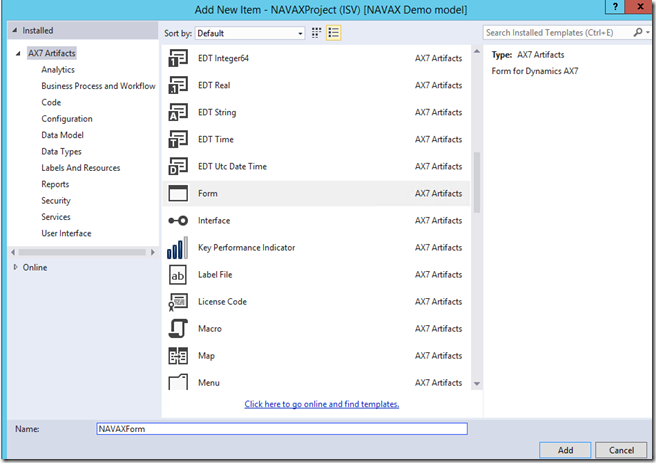

2016-01-14_1558


Initially it will show the pattern as unspecified. This is something we should always set if we expect our form to work across platforms (browsers). Otherwise we can set it to custom and it is free form. Which is a bit messy and unsupported.
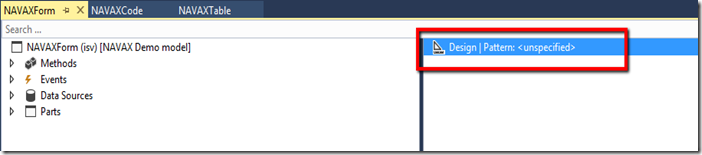

2016-01-14_1600
Right click the Design and apply a pattern.
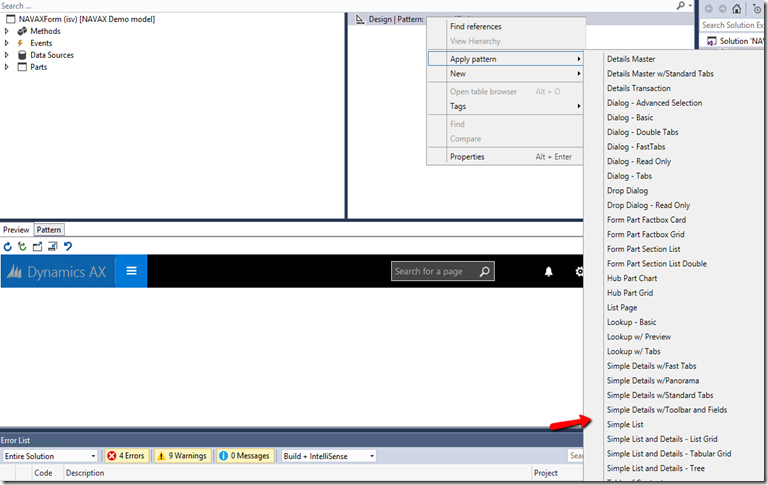
2016-01-14_1601


Once you have applied a pattern the bottom part of the form will show you the expected pattern. Now it is a matter of filling it up with the required control types.
Lets right click New > control we want to add.
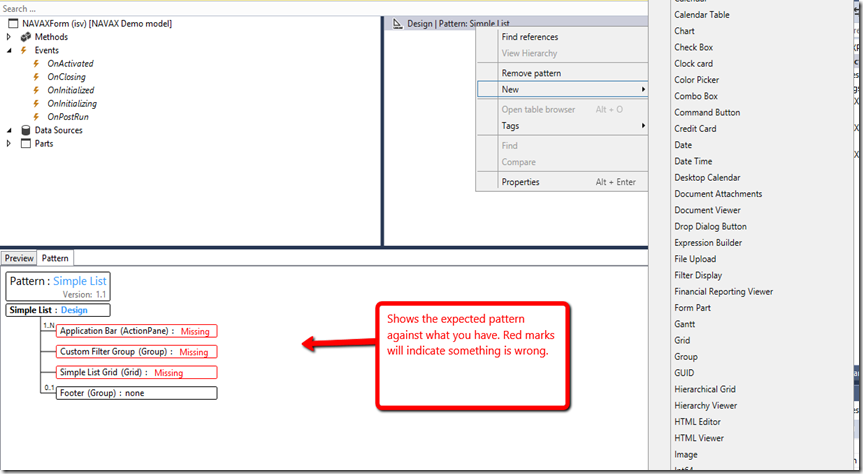

2016-01-14_1608


Once you have added all your required controls.
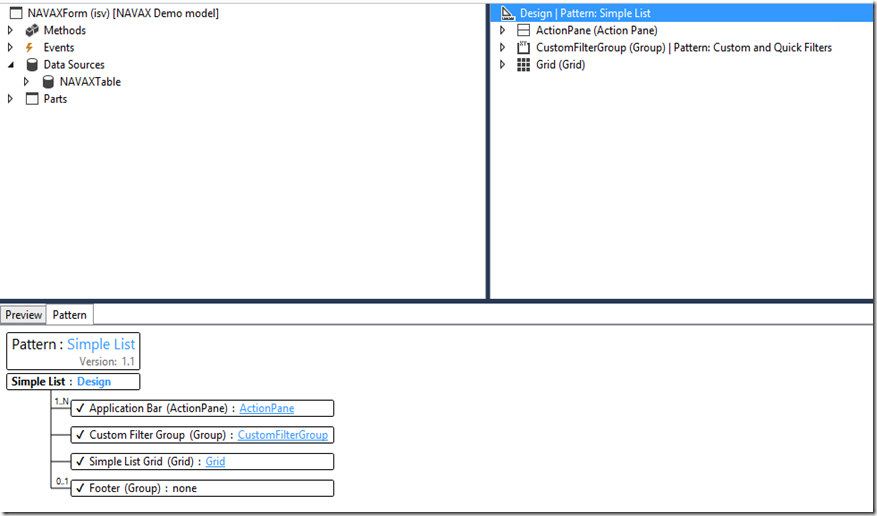
Drag the table from the AOT to the Data Sources node. It should look something like this.

2016-01-14_1611
2016-01-14_1613


Now you can preview by clicking the tab.

Build your VS project. There should be no errors.
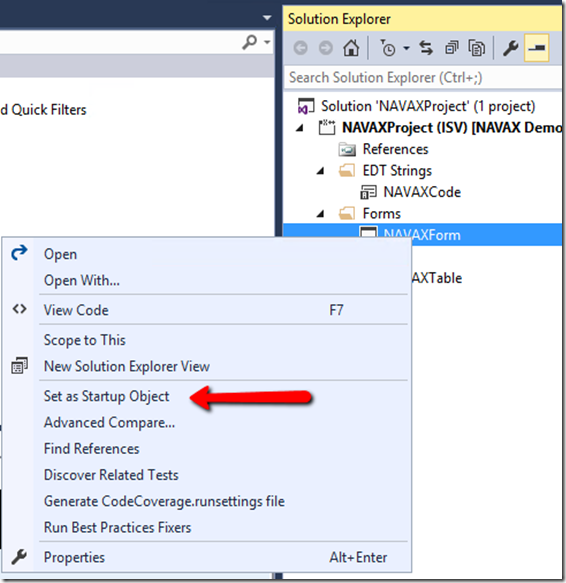
If you want to debug and run in a browser. Make sure to set the object as your Start Object.
\
2016-01-14_1614

create form in AX7

Lets have a look at creating a form. This is probably a little more exciting than the previous posts. As this is totally new to AX7.
Right click and Add > New
Select the Form object from the AX7 Artifacts


2016-01-14_1558


Initially it will show the pattern as unspecified. This is something we should always set if we expect our form to work across platforms (browsers). Otherwise we can set it to custom and it is free form. Which is a bit messy and unsupported.


2016-01-14_1600
Right click the Design and apply a pattern.
2016-01-14_1601


Once you have applied a pattern the bottom part of the form will show you the expected pattern. Now it is a matter of filling it up with the required control types.
Lets right click New > control we want to add.


2016-01-14_1608


Once you have added all your required controls.
Drag the table from the AOT to the Data Sources node. It should look something like this.


2016-01-14_1611
2016-01-14_1613


Now you can preview by clicking the tab.

Build your VS project. There should be no errors.
If you want to debug and run in a browser. Make sure to set the object as your Start Object.
\

2016-01-14_1614

Sunday, 31 January 2016

X++ in AX7: Readonly keyword

In AX7 X++ now supports the readonly keyword. Semantically it is identical to readonly in C#.


In short; it allows you to define members on a class that can only be initialized in the declaration and in the constructor.


class MyClass
{
    readonly str identifier = "XYZ";
    readonly str identifier2;

    public void new(str _identifier)
    {
        identifier2 = _identifier;
    }

    public void foo()
    {
        // The field 'identifier2' is read only. A value cannot be assigned to it.
        //identifier2 = "ABC"; 
    }
}  


The big question is "when to use it?" In my opinion the actual use scenarios are limited – simply because other language constructs are still missing.


In X++ we still recommend the construct pattern and the newFrom pattern. These patterns recommend the new method to not have any parameters – readonly has little applicability, when the new method is parameter-less.


So why do we prefer parameter-less new methods?
  1. It enables serialization of classes using the pack/unpack pattern – all classes extending RunBase are subject to this.
  2. It enables the extension framework and smart customizations.
Once X++ supports getters/setters and method overloading (at least of the new method) – then readonly will become handy.'


If you have a good use scenario for readonly - please share in the comments section below.

X++ in AX7: Readonly keyword

In AX7 X++ now supports the readonly keyword. Semantically it is identical to readonly in C#.


In short; it allows you to define members on a class that can only be initialized in the declaration and in the constructor.


class MyClass
{
    readonly str identifier = "XYZ";
    readonly str identifier2;

    public void new(str _identifier)
    {
        identifier2 = _identifier;
    }

    public void foo()
    {
        // The field 'identifier2' is read only. A value cannot be assigned to it.
        //identifier2 = "ABC"; 
    }
}  


The big question is "when to use it?" In my opinion the actual use scenarios are limited – simply because other language constructs are still missing.


In X++ we still recommend the construct pattern and the newFrom pattern. These patterns recommend the new method to not have any parameters – readonly has little applicability, when the new method is parameter-less.


So why do we prefer parameter-less new methods?
  1. It enables serialization of classes using the pack/unpack pattern – all classes extending RunBase are subject to this.
  2. It enables the extension framework and smart customizations.
Once X++ supports getters/setters and method overloading (at least of the new method) – then readonly will become handy.'


If you have a good use scenario for readonly - please share in the comments section below.