Showing posts with label dynamics ax 2012 r2. Show all posts

Friday, 13 November 2015

Electronic Signature in AX2012

Set Up Electronic Signature

Goto Organization Administrator -> Setup -> Electronic Signature
 

Goto Electronic Signature Parameter


    Translation :- Opens a form where you can enter notice text in additional languages. '

 Notice :-  notice that signers will see on the Sign document form. You can enter any text.  Typically, this text tells the user what it means to sign a document electronically, including legal implications.

Requirement CommentsSelect this option if all signers are required to enter a comment when signing 

Signature TimeOut -        An amount of time in seconds. If a signature has not been provided in    this time frame, the signing process fails.

Signature Alert Recepient:-
The user who should receive an alert email if signature validation fails.
Validation fails if the system determines that the certificate and private key provided by a user show signs of tampering.

Goto Electronic Signature ReasonCode


Use this form to set up reason codes for electronic signatures. A reason code indicates the purpose of a signature. For example, you could set up a reason code to indicate approval by the legal department. Signers from the legal department would use this reason code when providing an electronic signature.

Reason code  A code used to indicate the purpose of a signature. For example, the reason code LEGAL could indicate legal approval, and the reason code PLAN could indicate planning approval.

Descriptions  A short description for the reason code.


Goto Electronic Signature Reason

 
this is the form where we exactly add the table name and conditions to provide security to that table
 
 
we have here Requirement anme , procedure type and Signature Required flag.
we can add new Name , it will add the record with user define type and make the flag trueof signature required
 
now in the Properties button we will find a new form
 
in this form we can provide the name of the table, on which field we need to make signature enable and on what condition
 
if we wan to make it enable on Insertion or update or at the time of Delete.


Electronic Signature in AX2012

Set Up Electronic Signature

Goto Organization Administrator -> Setup -> Electronic Signature
 

Goto Electronic Signature Parameter


    Translation :- Opens a form where you can enter notice text in additional languages. '

 Notice :-  notice that signers will see on the Sign document form. You can enter any text.  Typically, this text tells the user what it means to sign a document electronically, including legal implications.

Requirement CommentsSelect this option if all signers are required to enter a comment when signing 

Signature TimeOut -        An amount of time in seconds. If a signature has not been provided in    this time frame, the signing process fails.

Signature Alert Recepient:-
The user who should receive an alert email if signature validation fails.
Validation fails if the system determines that the certificate and private key provided by a user show signs of tampering.

Goto Electronic Signature ReasonCode


Use this form to set up reason codes for electronic signatures. A reason code indicates the purpose of a signature. For example, you could set up a reason code to indicate approval by the legal department. Signers from the legal department would use this reason code when providing an electronic signature.

Reason code  A code used to indicate the purpose of a signature. For example, the reason code LEGAL could indicate legal approval, and the reason code PLAN could indicate planning approval.

Descriptions  A short description for the reason code.


Goto Electronic Signature Reason

 
this is the form where we exactly add the table name and conditions to provide security to that table
 
 
we have here Requirement anme , procedure type and Signature Required flag.
we can add new Name , it will add the record with user define type and make the flag trueof signature required
 
now in the Properties button we will find a new form
 
in this form we can provide the name of the table, on which field we need to make signature enable and on what condition
 
if we wan to make it enable on Insertion or update or at the time of Delete.


Wednesday, 11 November 2015

Change the password of the service account.

goto services.msc


Select the service for which you want to change the password. and goto properties.

 
you can make it as manual or automatic startup, this one is useful when your system will start.


select the log on tab  to change the password.


apply this change to all SQL services where this username is being used.

sometime there will be situation when Dynamics ax process will be on starting status for longtime and then stop for that please check following thing.

  • try to start services from command prompt with elevated permissions using the below command :
"net start AOS60$01"

  • check the event viewer for perticular error and try to solve it 
  • check the dependent services like SQL, that they are running fine.
  • there can be possibility that some of the process running on SQL side blocking the AX metadata, please stop that processes first.


Change the password of the service account.

goto services.msc


Select the service for which you want to change the password. and goto properties.

 
you can make it as manual or automatic startup, this one is useful when your system will start.


select the log on tab  to change the password.


apply this change to all SQL services where this username is being used.

sometime there will be situation when Dynamics ax process will be on starting status for longtime and then stop for that please check following thing.

  • try to start services from command prompt with elevated permissions using the below command :
"net start AOS60$01"

  • check the event viewer for perticular error and try to solve it 
  • check the dependent services like SQL, that they are running fine.
  • there can be possibility that some of the process running on SQL side blocking the AX metadata, please stop that processes first.


Approved Workflow using code.

Below is the code to approve workflow thru code for any perticular Expense Order, same code can be use for SO, PO and many more.


static void ASCApprovedExpWorkflow_ex(Args _args)
{
TRVExpTable trvExpTable;
WorkflowWorkItemTable workflowWorkItemTable;
WorkFlowTrackingStatusTable workflowTrackingStatusTable;
trvExpTrans trvexpTrans;
;
ttsbegin;
select forupdate trvExpTable where trvExpTable.ExpNumber == ExpId && trvExpTable.dataAreaId == COMPANYID
{
       trvExpTable.ApprovalStatus = TrvAppStatus::Approved;
       trvExpTable.update();
       ttsbegin;
       while select forupdate trvExpTrans where trvExpTrans.ExpNumber == trvExpTable.ExpNumber &&                        trvExpTrans.dataAreaId == COMPANYID
     {
              trvExpTrans.ApprovalStatus = TrvAppStatus::Approved;
              trvExpTrans.update();
       }
     ttscommit;
     ttsbegin;
      while select forupdate workflowTrackingStatusTable where workflowTrackingStatusTable.ContextRecId == trvExpTable.RecId && workflowTrackingStatusTable.ContextTableId == trvExpTable.TableId
 && workflowTrackingStatusTable.dataAreaId == COMPANYID
       {
                 workflowTrackingStatusTable.TrackingStatus = WorkflowTrackingStatus::Completed;
                 workflowTrackingStatusTable.update();
                 ttsbegin;
                 while select forupdate workflowWorkItemTable where workflowWorkItemTable.RefRecId ==   workflowTrackingStatusTable.ContextRecId && workflowWorkItemTable.RefTableId == workflowTrackingStatusTable.ContextTableId && workflowWorkItemTable.dataAreaId == COMPANYID
                  {
                           workflowWorkItemTable.Status = WorkflowWorkItemStatus::Completed;
                           workflowWorkItemTable.update();
                   }
                ttscommit;
     }
   ttscommit;
}
ttscommit;
}


Approved Workflow using code.

Below is the code to approve workflow thru code for any perticular Expense Order, same code can be use for SO, PO and many more.


static void ASCApprovedExpWorkflow_ex(Args _args)
{
TRVExpTable trvExpTable;
WorkflowWorkItemTable workflowWorkItemTable;
WorkFlowTrackingStatusTable workflowTrackingStatusTable;
trvExpTrans trvexpTrans;
;
ttsbegin;
select forupdate trvExpTable where trvExpTable.ExpNumber == ExpId && trvExpTable.dataAreaId == COMPANYID
{
       trvExpTable.ApprovalStatus = TrvAppStatus::Approved;
       trvExpTable.update();
       ttsbegin;
       while select forupdate trvExpTrans where trvExpTrans.ExpNumber == trvExpTable.ExpNumber &&                        trvExpTrans.dataAreaId == COMPANYID
     {
              trvExpTrans.ApprovalStatus = TrvAppStatus::Approved;
              trvExpTrans.update();
       }
     ttscommit;
     ttsbegin;
      while select forupdate workflowTrackingStatusTable where workflowTrackingStatusTable.ContextRecId == trvExpTable.RecId && workflowTrackingStatusTable.ContextTableId == trvExpTable.TableId
 && workflowTrackingStatusTable.dataAreaId == COMPANYID
       {
                 workflowTrackingStatusTable.TrackingStatus = WorkflowTrackingStatus::Completed;
                 workflowTrackingStatusTable.update();
                 ttsbegin;
                 while select forupdate workflowWorkItemTable where workflowWorkItemTable.RefRecId ==   workflowTrackingStatusTable.ContextRecId && workflowWorkItemTable.RefTableId == workflowTrackingStatusTable.ContextTableId && workflowWorkItemTable.dataAreaId == COMPANYID
                  {
                           workflowWorkItemTable.Status = WorkflowWorkItemStatus::Completed;
                           workflowWorkItemTable.update();
                   }
                ttscommit;
     }
   ttscommit;
}
ttscommit;
}


Function EcoResProductNumberBuilderVariant.validateForNumber has been incorrectly called


Solution:      It is data problem,

EcoResProductIdentifier table missing the values for perticulat Product Number, create reacord manually.

Function EcoResProductNumberBuilderVariant.validateForNumber has been incorrectly called


Solution :      It is data problem,

EcoResProductIdentifier table missing the values for perticulat Product Number, create reacord manually.

Using the Infolog , Error box on the EP(Enterprise Portal):


Solution:     In the portal you can access the infolog by using the Proxy of the Enterprise Portal.

using Proxy = Microsoft.Dynamics.Framework.BusinessConnector.Proxy;

Proxy.Info objInfoLog = new Proxy.Info(this.AxSession.AxaptaAdapter);
 

Now, when you want to write something to the infolog you need to give a Enum with it, so the portal knows if the message you want to show is a info, warning or error. So pass through Proxy.Exception.Info, Proxy.Exception.Warning or Proxy.Exception.Error.

 objInfoLog.add(Proxy.Exception.Warning, "My warning");

Failed to create a session; confirm that the user has the proper privileges to log on to Microsoft Dynamics.


Solution:-

  • Run full CIL
  • Try to solve all errors if any
  • In the database give the proper rigths to the current login user
  • Try to use without Execute CIL checkbox


Failed to create a session; confirm that the user has the proper privileges to log on to Microsoft Dynamics.


Solution:-

  • Run full CIL
  • Try to solve all errors if any
  • In the database give the proper rigths to the current login user
  • Try to use without Execute CIL checkbox


Tuesday, 10 November 2015

Disable Business operation in CIL.


goto Tools -> Options -> Development

Disable Execute business operation in CIL


How to create PO from approved PR lines

Click Procurement and sourcing > Common > Purchase requisitions > Release approved purchase requisitions.
 
  • Use this form to review approved purchase requisition lines that have been held for manual processing, consolidate eligible requisition lines, and manually convert the approved purchase requisitions to purchase orders.

  • A purchase order is created for each currency, vendor, or legal entity that is identified on the purchase requisition lines. For example, if a purchase requisition has two lines, and each line has a different vendor, currency, or legal entity, two purchase orders are created. Also, depending on how purchasing policies are configured for your organization, separate purchase orders can be created if the purchase requisition lines have different requesters, line types, or procurement categories.
 

Debbuger is coming blank or Its showing No debugger has installed.

There are many reasons behind this error.


  • User is not in the list of Microsoft Dynamics Debugger Group. control panel -> user account -> change user account type-> select advance tab -> clcik advance button-> select group -> double click on microsoft Dynamics AX Debugger group-> add user.


  • User is not in the list of Administrator Group. control panel -> user account -> change user account type-> select advance tab -> clcik advance button-> select group -> double click on Administrator group-> add user.
  • UAC should be disable. control panel -> User account -> User Account control setting -> select never notify.

  • Run as administrator while open AX. right click ax clinet and select run as administrator.
  • Install the Debbuger from the AX setup file.
  • Dynamics AX server configuration, check the Enable Breakpoint to debug X++ code running and Enable Global breakpoint


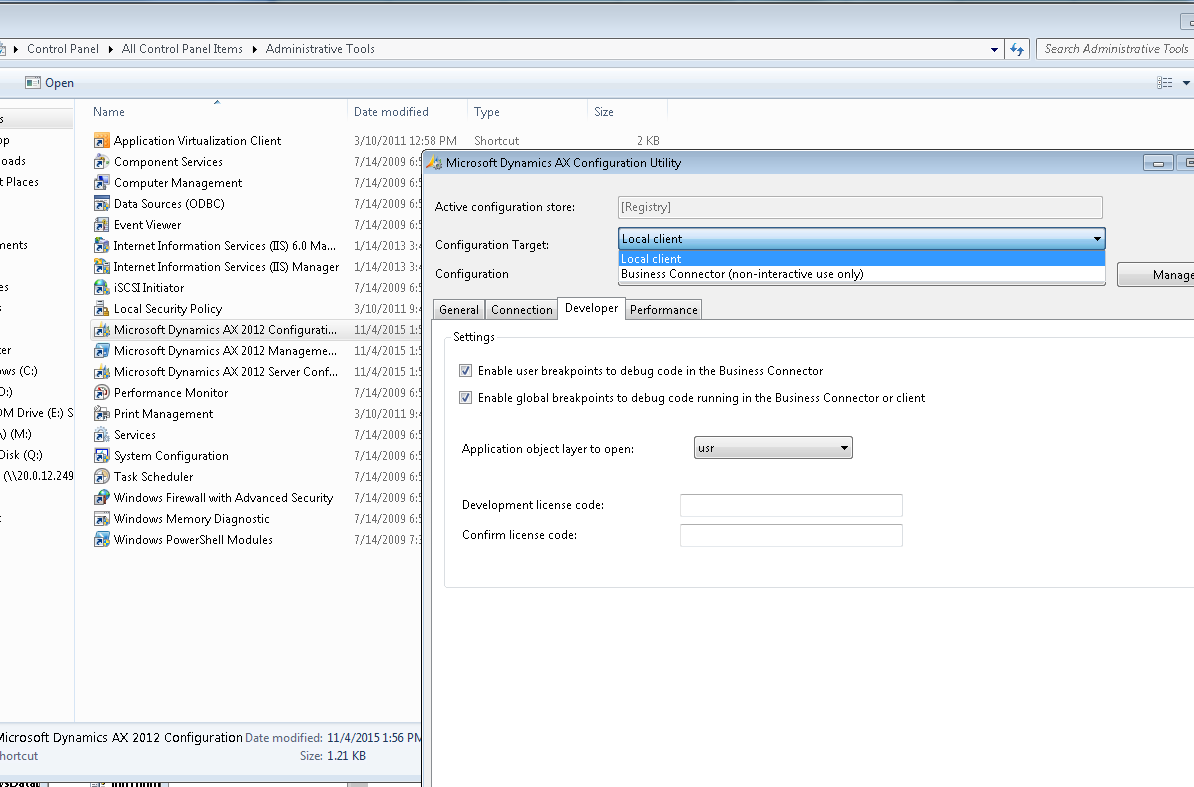
  • Dynamics AX client configuration -> configuration target , select business connector and Local client both one by one and check the Enable user breakpoint to debug .. checkbox and Enable global breakpoint to debug .. checkbox


Debbuger is coming blank or Its showing No debugger has installed.

There are many reasons behind this error.


  • User is not in the list of Microsoft Dynamics Debugger Group. control panel -> user account -> change user account type-> select advance tab -> clcik advance button-> select group -> double click on microsoft Dynamics AX Debugger group-> add user.


  • User is not in the list of Administrator Group. control panel -> user account -> change user account type-> select advance tab -> clcik advance button-> select group -> double click on Administrator group-> add user.
  • UAC should be disable. control panel -> User account -> User Account control setting -> select never notify.

  • Run as administrator while open AX. right click ax clinet and select run as administrator.
  • Install the Debbuger from the AX setup file.
  • Dynamics AX server configuration, check the Enable Breakpoint to debug X++ code running and Enable Global breakpoint


  • Dynamics AX client configuration -> configuration target , select business connector and Local client both one by one and check the Enable user breakpoint to debug .. checkbox and Enable global breakpoint to debug .. checkbox